License For Envato
Easily integrate and manage Envato purchase-code license validation on your WordPress themes and plugins. Follow the three steps below to get started.
Overview
License For Envato acts as a license server: it validates Envato purchase codes through the official Envato API and stores per-domain activation records in your database.
How It Works
Admin Screens
A quick tour of the screens you will use under the License Envato menu in wp-admin.
Dashboard
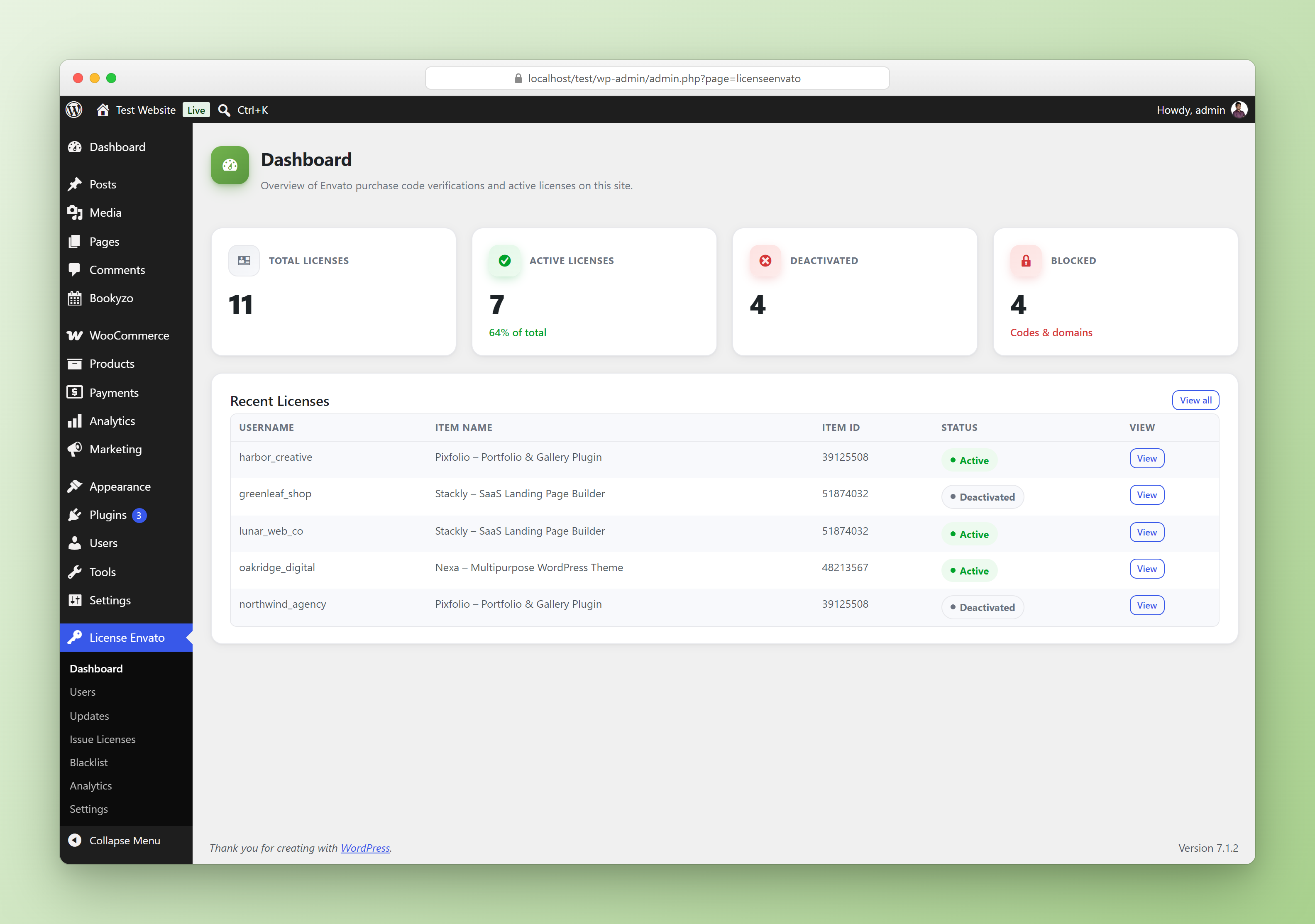
Total / Active / Deactivated / Blocked license counts and your five most recent licenses at a glance.
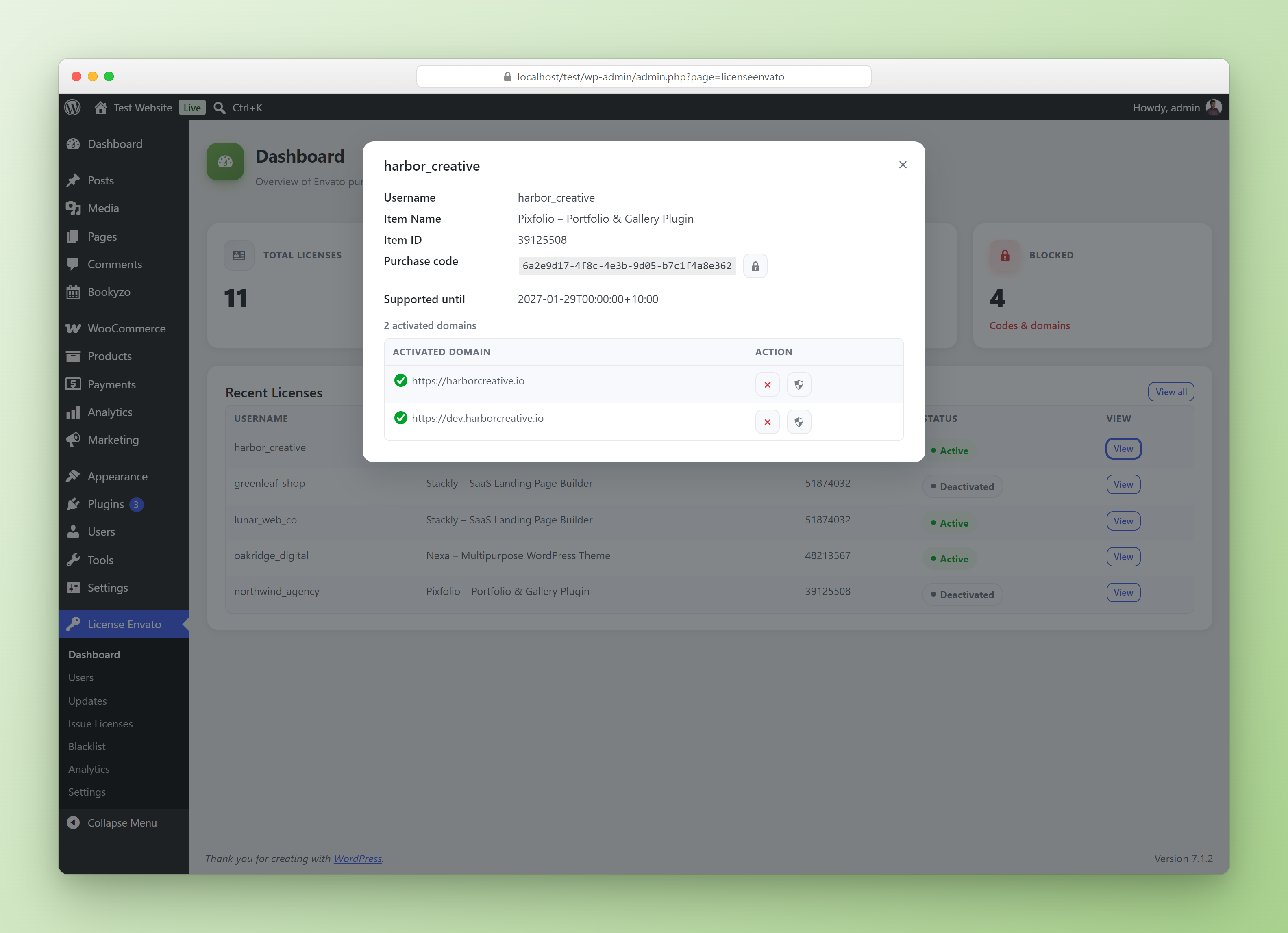
Click View on any license to open its details: purchase code, license type, support expiry and every activated domain, each with its own deactivate action.
Users
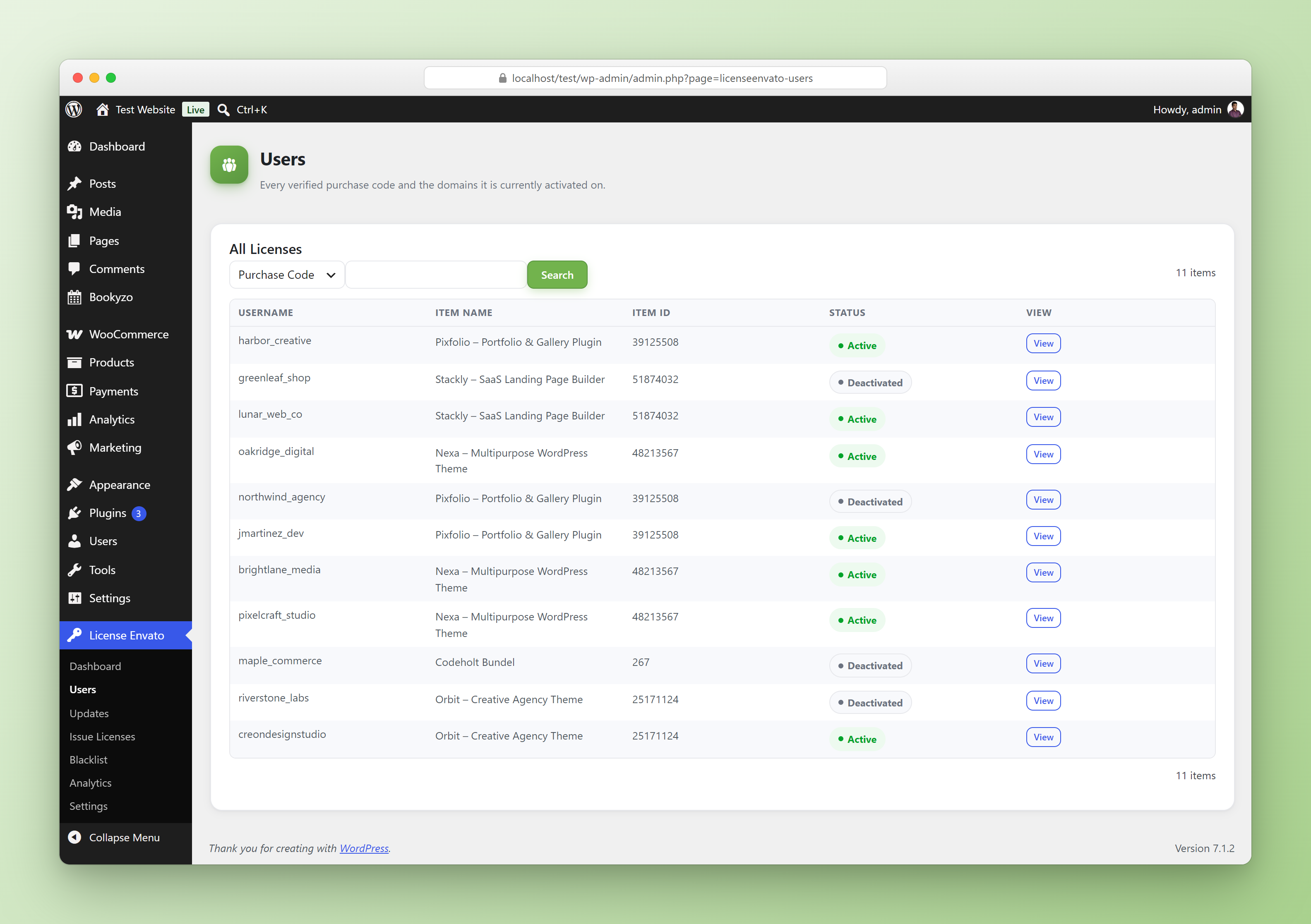
Every license in one searchable list — username, item name, item ID and status.
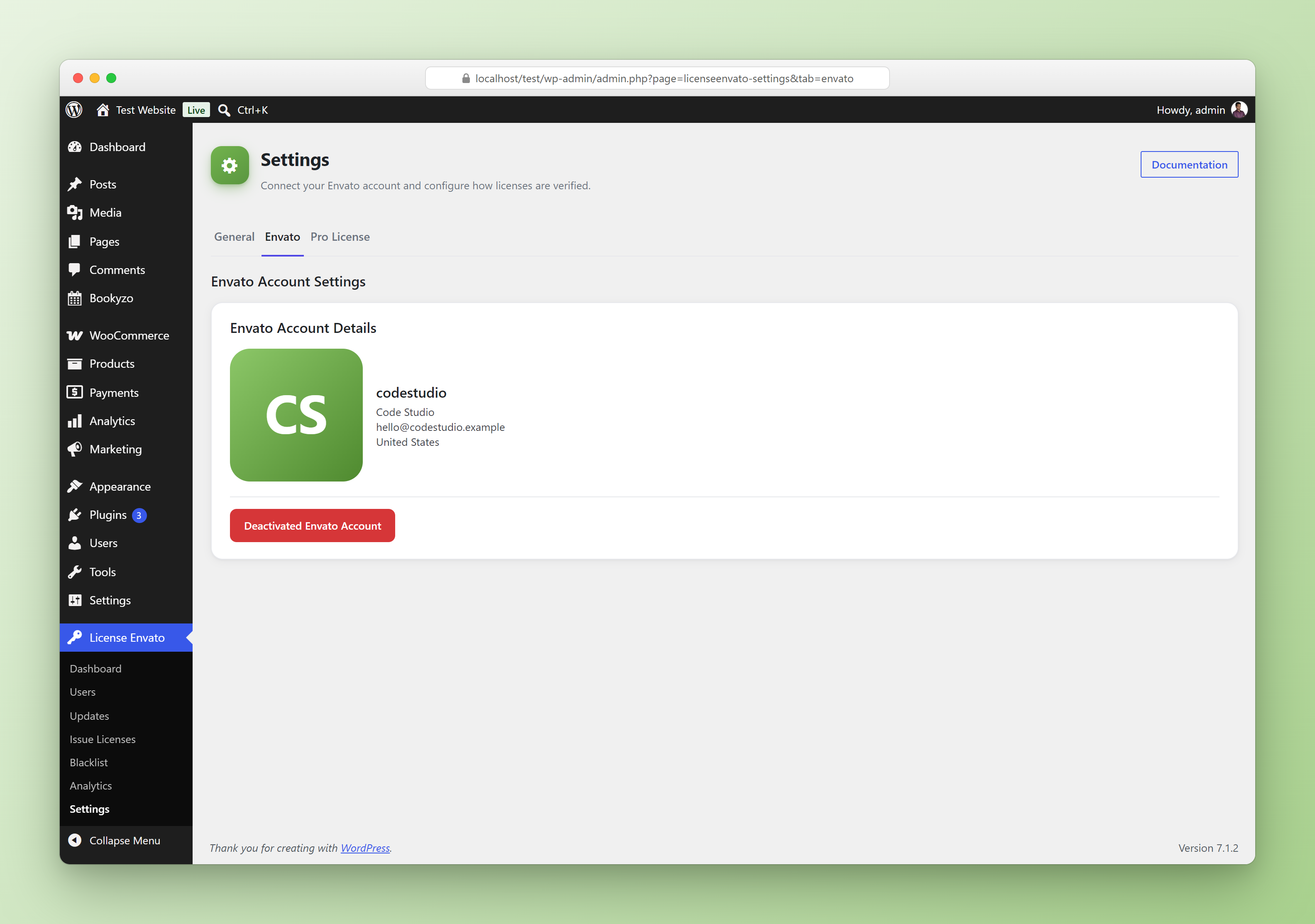
Settings → Envato
Connect your Envato personal token and review the connected Envato account. This is the screen described in Step 1 below.
1 Server Setup
Configure this plugin on the WordPress site that will act as your license server.
Install & Activate
- Install and activate the License For Envato plugin on your WordPress site.
- Navigate to License Envato → Settings → Envato tab.
- Paste your Envato personal token and click Save Envato Token.
Create Your Envato Token
Your token needs the following minimum permissions:
| Required Permission |
|---|
| View and search Envato sites |
| View your Envato Account username |
| View your email address |
| Verify purchases of your items |
| List purchases you've made |
Your Server URL
Use the following URL (your WordPress site URL) in your client integration (Step 2):
https://YOUR_SITE_URL
2 Client Integration
Copy the class below into your theme or plugin. It handles license activation and deactivation by calling your server's REST API.
Setup Instructions
- Copy the full class code below into your theme's
functions.phpor a dedicated file in your plugin. - Replace
YOUR_SITE_URLwith your server URL (shown in Step 1). - Replace
TEXT_DOMAINwith your theme/plugin's text domain. - Replace
YOUR_PREFIXwith a unique prefix for your product (e.g.mytheme).
PREFIX to avoid collisions in the WordPress options table.The Integration Class
<?php
/**
 * licenseCodeVerifyForm()
 */

class licenseCodeVerifyForm {

    const LICENCE_CALL_URL = "YOUR_SITE_URL";
    const PREFIX = "YOUR_PREFIX";

    private $licenceActivate_error;
    private $licenceDeactivate_error;

    public function __construct() {

        $this->licenceActivate_error = $this->licenceActivate();
        $this->licenceDeactivate_error = $this->licenceDeactivate();

        $this->LicenceHTMLForm();
    }

    public function LicenceHTMLForm(){ ?>
        <h2><?php esc_html_e('License Activation Form', 'TEXT_DOMAIN');?></h2>
        <?php
        $token = get_option(self::PREFIX.'_envato_token');
        $isActivated = get_option(self::PREFIX.'_envato_is_activated');

        if ($token && $isActivated) {
            ?>
            <?php
            if ($this->licenceDeactivate_error) {?>
                <p class="licence_error"><?php echo esc_html( $this->licenceDeactivate_error );?></p>
            <?php }?>
            <p><?php esc_html_e('You can click this button to deactivate your license code from this domain if you are going to transfer your website to some other domain or server.', 'TEXT_DOMAIN');?></p>
            <form method="post">
                <input type="hidden" name="envato_deactivate" value="1">
                <?php wp_nonce_field( 'submit_deactivate' ); ?>
                <?php submit_button( esc_html__( 'Deactivate', 'TEXT_DOMAIN' ), 'danger', 'submit_deactivate' ); ?>
            </form>
            <?php
        } else { ?>
            <?php
            if ($this->licenceActivate_error) {?>
                <p class="licence_error"><?php echo esc_html( $this->licenceActivate_error );?></p>
            <?php }?>
            <form method="post">
                <label for="purchase_code"><?php esc_html_e('Purchase code', 'TEXT_DOMAIN'); ?>
                    (<a href="https://help.market.envato.com/hc/en-us/articles/202822600-Where-Is-My-Purchase-Code-"
                       target="_blank"><?php esc_html_e('Where can I get my purchase code?', 'TEXT_DOMAIN');?></a>)
                </label>
                <input type="text" style="width:100%" id="purchase_code" name="purchase_code"
                       placeholder="Example: 1e71cs5f-13d9-41e8-a140-2cff01d96afb">
                <?php wp_nonce_field( 'submit_activate' ); ?>
                <?php submit_button( esc_html__( 'Activate', 'TEXT_DOMAIN' ), 'danger', 'submit_activate' ); ?>
            </form>
            <?php
        }
    }

    private function licenceActivate() {
        if ( ! isset( $_POST['submit_activate'] ) ) {
            return;
        }
        if ( ! isset( $_POST['purchase_code'] ) || empty( $_POST['purchase_code'] ) ) {
            return 'Please Enter Purchase Code.';
        }
        // Unslash and sanitize nonce
        $nonce = isset( $_POST['_wpnonce'] ) ? sanitize_text_field( wp_unslash( $_POST['_wpnonce'] ) ) : '';
        if ( ! wp_verify_nonce( $nonce, 'submit_activate' ) ) {
            wp_die( 'Are you cheating?' );
        }
        if ( ! current_user_can( 'manage_options' ) ) {
            wp_die( 'Are you cheating?' );
        }
        // Unslash and sanitize purchase_code
        $purchase_code = isset( $_POST['purchase_code'] )
            ? sanitize_text_field( wp_unslash( $_POST['purchase_code'] ) )
            : '';

        if ( $purchase_code ) {
            $url    = self::LICENCE_CALL_URL . "/wp-json/licenseenvato/v1/active";
            $domain = $this->domain();
            $itemid = get_option( self::PREFIX . '_envato_itemid' );

            $response = $this->apicall( $url, $purchase_code, $domain, $itemid );
            $data     = json_decode( $response );

            $token  = isset( $data->token )  ? $data->token  : '';
            $itemid = isset( $data->itemid ) ? $data->itemid : '';
            if ( $token ) {
                update_option( self::PREFIX . '_envato_is_activated_' . $itemid, true );
                update_option( self::PREFIX . '_envato_token', $token );
                update_option( self::PREFIX . '_envato_purchase_code', $purchase_code );
                update_option( self::PREFIX . '_envato_itemid', $itemid );
            } else {
                $statusCode    = isset( $data->code )    ? $data->code    : '';
                $statusMessage = isset( $data->message ) ? $data->message : '';
                if ( $statusCode ) {
                    return $statusMessage;
                }
            }
        }
    }

    private function domain() {
        $domain = get_option( 'siteurl' );
        $domain = str_replace( 'http://',  '', $domain );
        $domain = str_replace( 'https://', '', $domain );
        $domain = str_replace( 'www',      '', $domain );
        return urlencode( $domain );
    }

    private function licenceDeactivate() {
        $code = get_option( self::PREFIX . '_envato_token' );
        if ( ! isset( $_POST['submit_deactivate'] ) ) {
            return;
        }
        // Unslash and sanitize nonce
        $nonce = isset( $_POST['_wpnonce'] ) ? sanitize_text_field( wp_unslash( $_POST['_wpnonce'] ) ) : '';
        if ( ! wp_verify_nonce( $nonce, 'submit_deactivate' ) ) {
            wp_die( 'Are you cheating?' );
        }
        if ( ! current_user_can( 'manage_options' ) ) {
            wp_die( 'Are you cheating?' );
        }
        // Unslash and sanitize envato_deactivate
        $envato_deactivate = isset( $_POST['envato_deactivate'] )
            ? sanitize_text_field( wp_unslash( $_POST['envato_deactivate'] ) )
            : '';

        if ( $envato_deactivate ) {
            $url      = self::LICENCE_CALL_URL . "/wp-json/licenseenvato/v1/deactive";
            $response = $this->apicall( $url, $code );
            $date     = json_decode( $response );

            $statusCode    = isset( $date->code )    ? $date->code    : '';
            $statusMessage = isset( $date->message ) ? $date->message : '';

            if ( $statusCode === 'already_deactivated' ) {
                delete_option( self::PREFIX . '_envato_is_activated' );
                delete_option( self::PREFIX . '_envato_token' );
                delete_option( self::PREFIX . '_envato_purchase_code' );
                delete_option( self::PREFIX . '_envato_itemid' );
            } elseif ( $statusCode ) {
                return $statusMessage;
            } else {
                delete_option( self::PREFIX . '_envato_is_activated' );
                delete_option( self::PREFIX . '_envato_token' );
                delete_option( self::PREFIX . '_envato_purchase_code' );
                delete_option( self::PREFIX . '_envato_itemid' );
            }
        }
    }

    private function apicall( $url, $purchase_code, $domain = null, $itemid = null ) {
        if ( $domain ) {
            $body = array(
                'code'   => $purchase_code,
                'domain' => $domain,
                'itemid' => $itemid,
            );
        } else {
            $body = array(
                'token' => $purchase_code,
            );
        }

        $headers  = array( 'Content-Type' => 'application/json' );
        $response = wp_remote_post( $url, array(
            'method'  => 'POST',
            'headers' => $headers,
            'body'    => json_encode( $body ),
        ) );

        return $response['body'];
    }
}
?>
3 Display the License Form
Once the class is in place, call it wherever you want to render the activation / deactivation form — for example, on your plugin's settings page.
<?php new licenseCodeVerifyForm(); ?>
REST API Reference
The plugin exposes two public REST endpoints under the namespace licenseenvato/v1.
Activate License
| Endpoint | https://YOUR_SITE_URL/wp-json/licenseenvato/v1/active |
| Method | POST |
| Auth | Public (no authentication required) |
Activate — Parameters
| Parameter | Type | Required | Description |
|---|---|---|---|
code |
string | ✔ | Envato purchase code |
domain |
string | ✔ | Customer's domain (URL-encoded) |
itemid |
string | ✔ | Envato item / product ID |
Deactivate License
| Endpoint | https://YOUR_SITE_URL/wp-json/licenseenvato/v1/deactive |
| Method | POST |
| Auth | Public (no authentication required) |
Deactivate — Parameters
| Parameter | Type | Required | Description |
|---|---|---|---|
token |
string | ✔ | License token returned during activation |
Domain Validation
The domain parameter must look like a real host: a hostname, IP address or localhost, optionally prefixed by a scheme and followed by a port or path (for example example.com, https://example.com/shop, localhost:8000). Values that contain spaces or control characters, user info (user@host), or are longer than 255 characters are rejected with HTTP 400 and the code invalid_domain. The value is stored exactly as sent — it is never rewritten.
Rate Limiting
Both endpoints are public, so each client IP is limited to a number of requests per window to stop purchase-code brute-forcing and protect your Envato API quota.
| Endpoint | Default limit | Window |
|---|---|---|
/active | 20 requests | 10 minutes |
/deactive | 30 requests | 10 minutes |
Exceeding the limit returns HTTP 429 with the code rate_limited and a Retry-After header (seconds). Tune it with these filters:
license_envato_rate_limit | Max requests per window; receives $limit, $endpoint ('active' or 'deactive'). Return 0 to disable. |
license_envato_rate_limit_window | Window length in seconds (default 600). |
license_envato_rate_limit_ip | The IP used as the limiter key. Only REMOTE_ADDR is trusted by default; if your site sits behind a proxy or CDN, return the real client IP here. |
429 and 400 responses and shows the returned message to the user.Example Request (Activate)
$response = wp_remote_post( 'https://YOUR_SITE_URL/wp-json/licenseenvato/v1/active', [
    'headers' => [ 'Content-Type' => 'application/json' ],
    'body'    => json_encode( [
        'code'   => $purchase_code,
        'domain' => urlencode( $domain ),
        'itemid' => $item_id,
    ] ),
] );
$data = json_decode( wp_remote_retrieve_body( $response ) );
// $data->token — store this token; you will need it for deactivation
Code Reference
A quick reference for the key constants and methods inside the integration class.
Constants
| Constant | Description |
|---|---|
LICENCE_CALL_URL |
Base URL of your license server (your WordPress site URL). |
PREFIX |
Unique prefix used for wp_options keys. Change this per product to avoid collisions. |
Key Methods
| Method | Visibility | Description |
|---|---|---|
LicenceHTMLForm() |
public | Renders the activate / deactivate form HTML. |
licenceActivate() |
private | Handles the activation POST, calls REST API, stores token. |
licenceDeactivate() |
private | Handles deactivation POST, calls REST API, clears options. |
apicall() |
private | Sends POST request to the server REST endpoint. |
domain() |
private | Returns the current site's domain (URL-encoded). |
wp_options Keys (Client-side)
| Option Key | Description |
|---|---|
{PREFIX}_envato_token |
Stored license token returned by the server on activation. |
{PREFIX}_envato_is_activated |
Boolean — whether the license is currently active. |
{PREFIX}_envato_purchase_code |
The raw Envato purchase code entered by the customer. |
{PREFIX}_envato_itemid |
Envato item ID associated with the activated license. |
{PREFIX} with the value you set for the PREFIX constant — for example, if your prefix is mytheme, the token key would be mytheme_envato_token.License For Envato Pro
A paid add-on that installs alongside this free plugin and unlocks automatic updates for your own products, WooCommerce license selling, activation limits, webhooks, blacklisting, activity logs and more — all through the same license server you already set up.
Free vs Pro
Everything in Free is included in Pro, plus the rows below.
| Feature | Free | Pro |
|---|---|---|
| Envato purchase code verification | ✓ | ✓ |
| Per-domain license activation & deactivation | ✓ | ✓ |
| REST API endpoints + copy-paste client class | ✓ | ✓ |
| Admin license list with search | ✓ | ✓ |
| Secure encrypted token storage | ✓ | ✓ |
| Multiple domain activations per license (configurable limits) | — | ✓ |
| Support expiry enforcement with Envato renewal re-sync | — | ✓ |
| Email notifications + daily expiry-warning digest | — | ✓ |
| Webhooks with signed payloads | — | ✓ |
| Purchase code & domain blacklist | — | ✓ |
| Activity log with CSV export | — | ✓ |
| Manual & bulk license issuance | — | ✓ |
| Automatic update delivery for your themes/plugins | — | ✓ |
| WooCommerce integration — auto-issued licenses & My Account Licenses tab | — | ✓ |
| Analytics dashboard | — | ✓ |
| Priority support | — | ✓ |
Pro Admin Pages
Once Pro is active and licensed, these pages appear under the License Envato menu.
| Page | What it does |
|---|---|
| Users | Now shows every activated domain per license (not just the first), each with its own deactivate action, and enforces your configured domain limit per purchase code. |
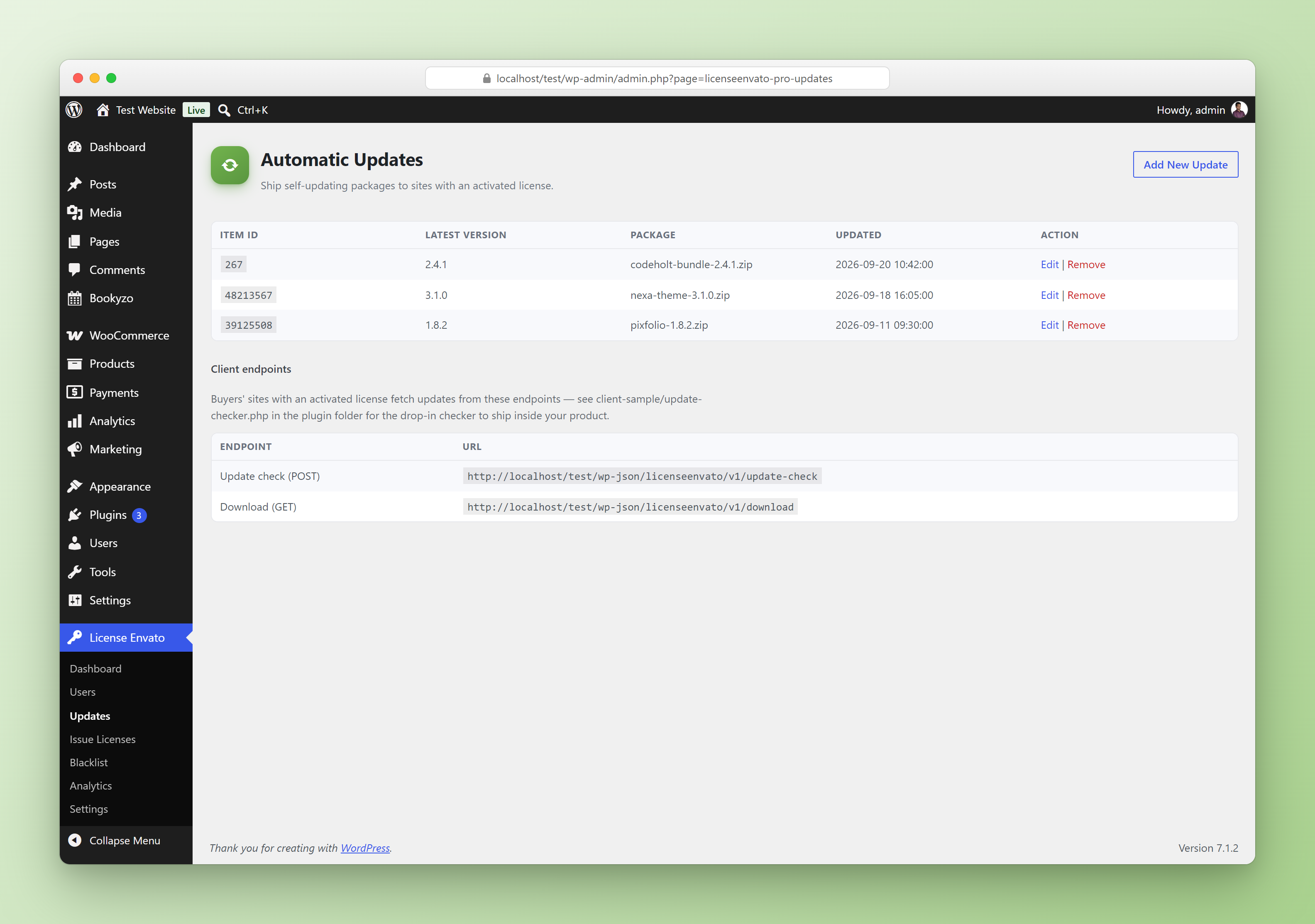
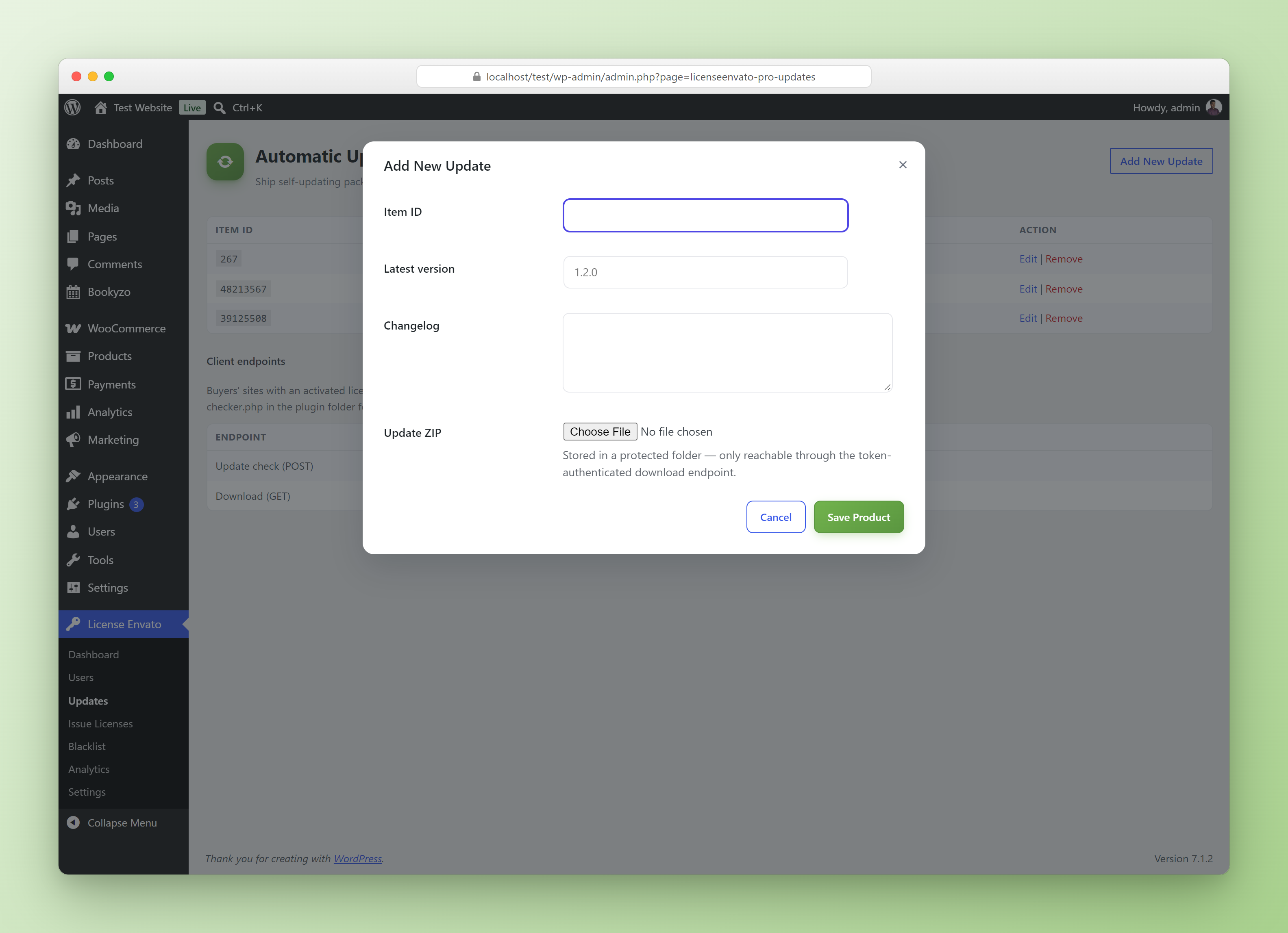
| Updates | Manage the latest version, changelog and update ZIP for each of your own Envato item IDs — this is what powers Automatic Update Delivery below. |
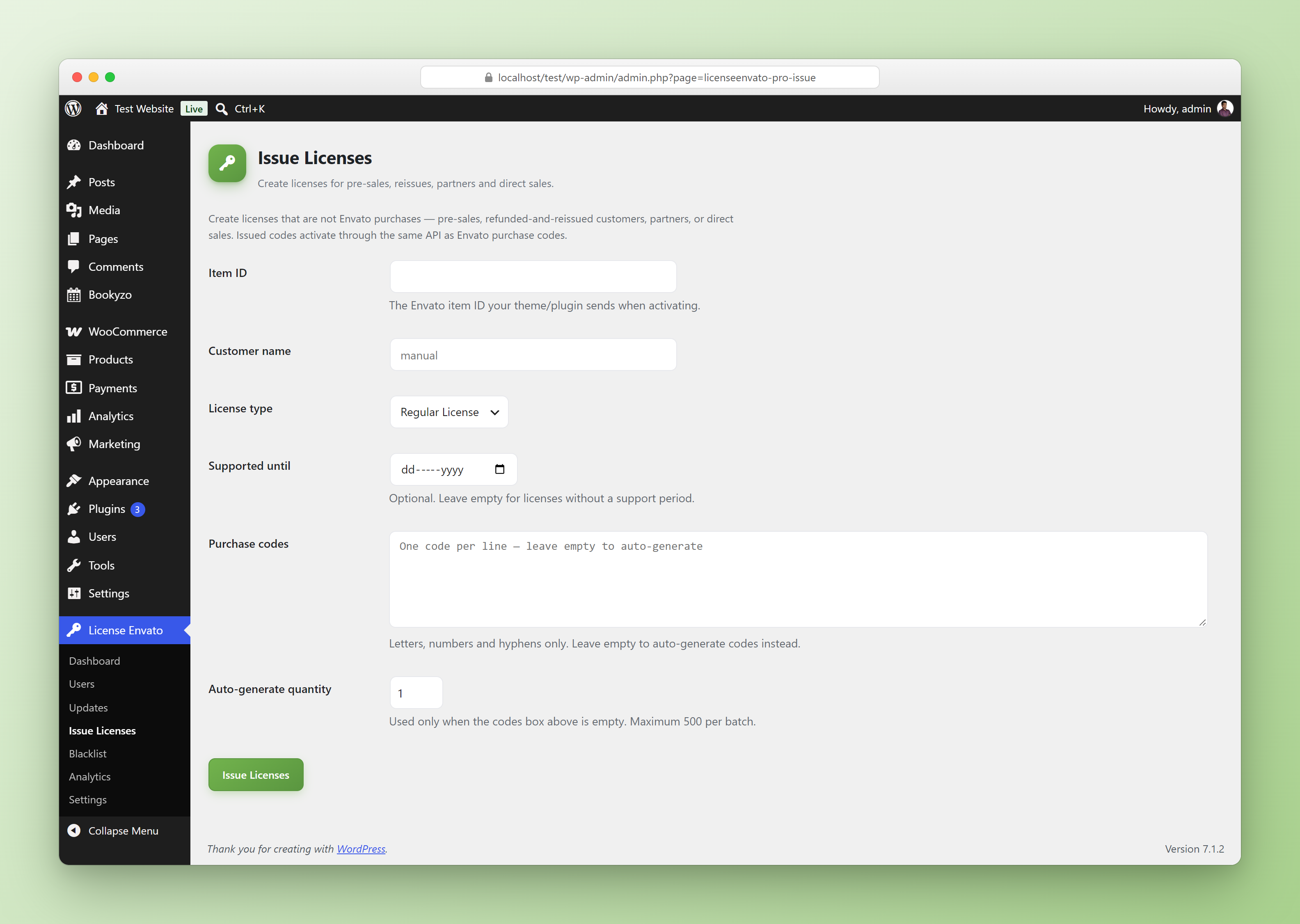
| Issue Licenses | Manually or bulk-issue license keys that work without an Envato purchase — useful for pre-sales, reissues or support cases. |
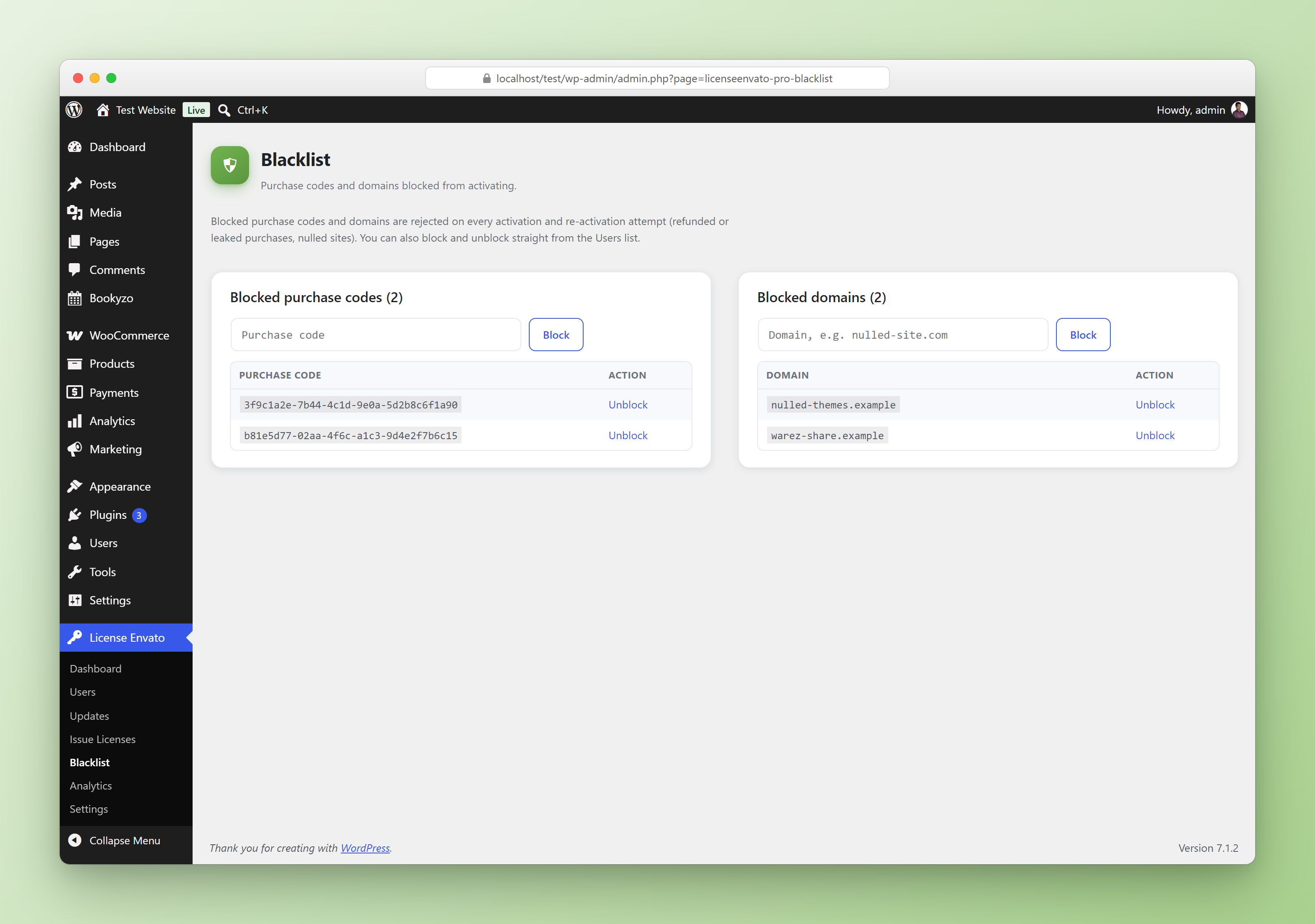
| Blacklist | Block a purchase code or a domain from activating; blocked activation attempts are rejected with a 403 from the REST API. |
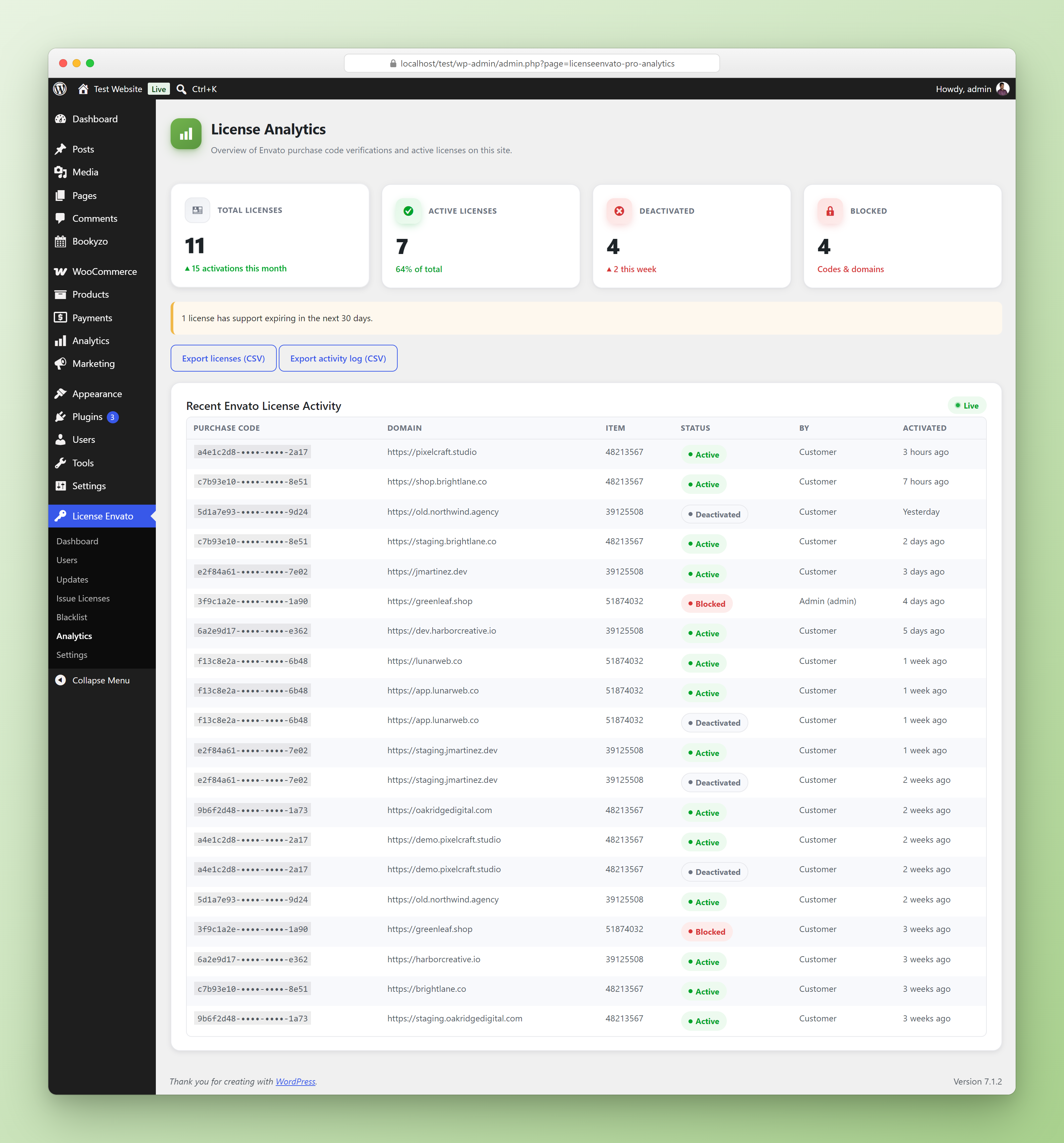
| Analytics | Dashboard view of activations, deactivations and license activity over time. |
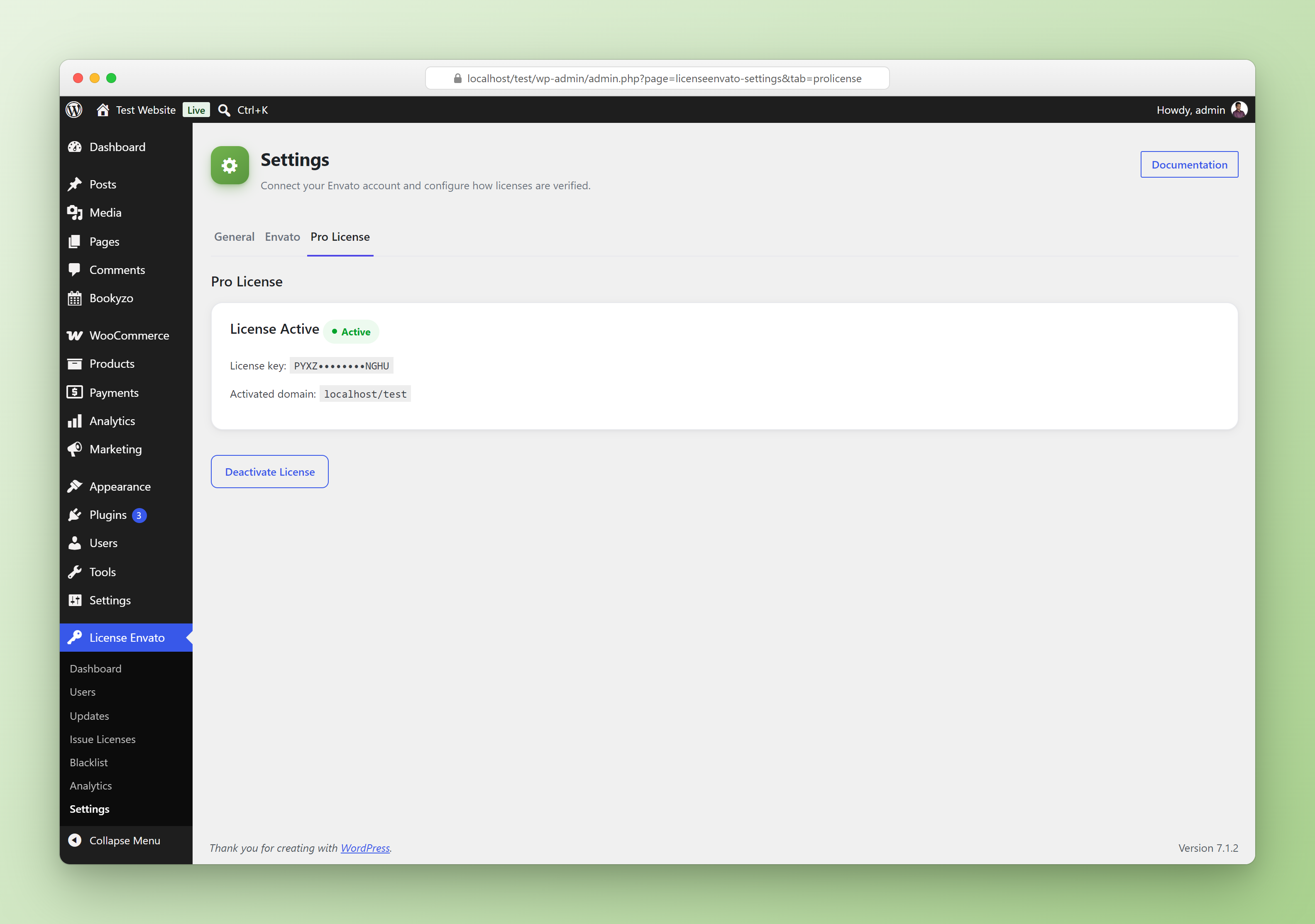
| Settings → Pro License | Activate/deactivate your own License For Envato Pro purchase code on this site; also where email notifications and webhook URLs are configured. |
Updates
Issue Licenses
Blacklist
Analytics
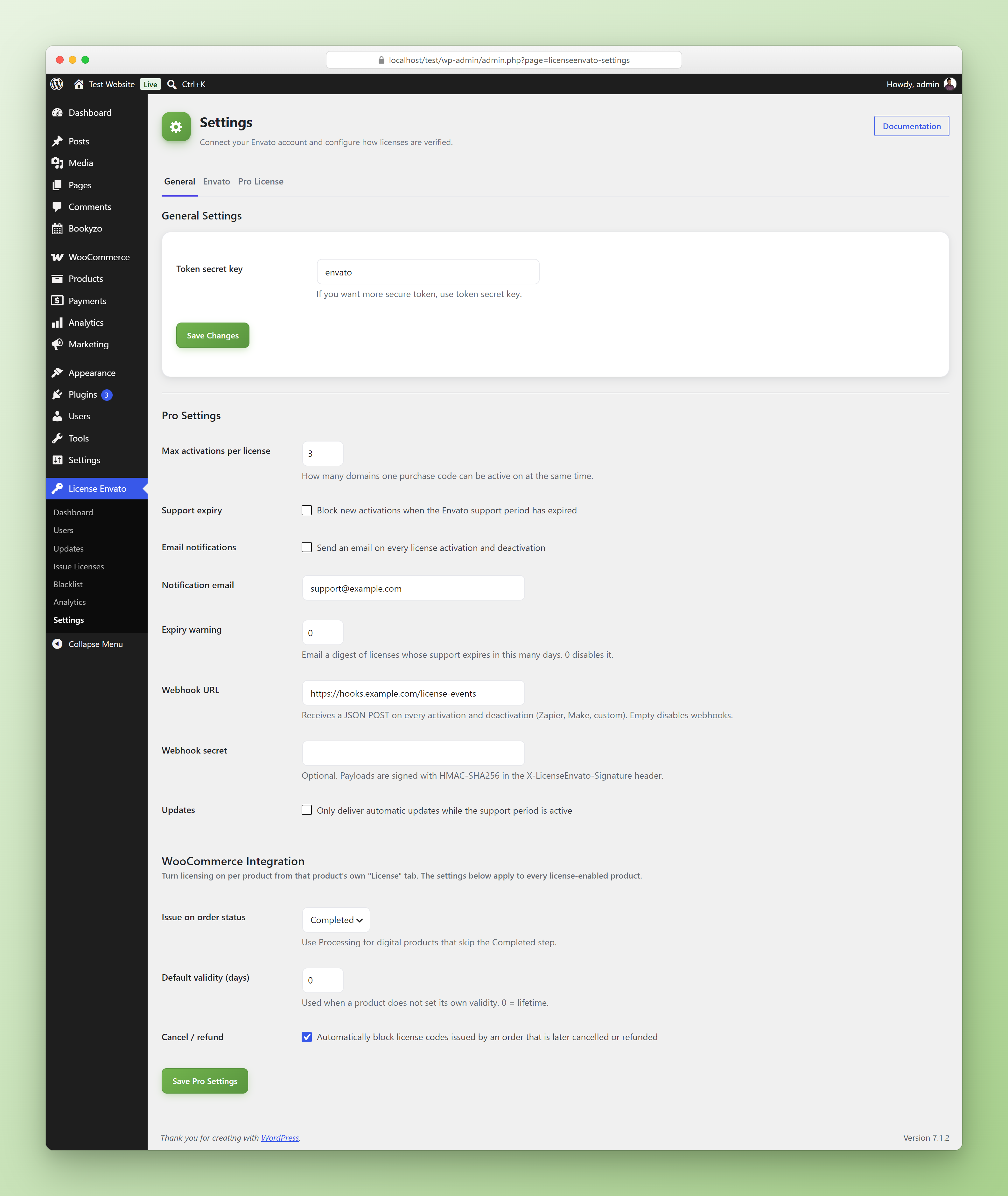
Pro Settings
Pro settings appear below the free fields on Settings → General: activation limit, support-expiry enforcement, email notifications, expiry-warning digest, webhooks and — when WooCommerce is active — the WooCommerce Integration options.
Pro License
Automatic Update Delivery
Pro turns your license server into an update server too, so your customers get one-click updates from their WordPress Plugins screen — no separate hosting needed.
How It Works
- Upload each product's latest version, changelog and ZIP under License Envato → Updates.
- Ship the drop-in
client-sample/update-checker.phpclass (included with Pro) inside your own theme or plugin. - The client polls your server's token-authenticated REST endpoints and WordPress core handles the rest — update notice, changelog popup, one-click install.
| Update check | POST /wp-json/licenseenvato/v1/update-check — body: token, itemid, version |
| Download | GET /wp-json/licenseenvato/v1/download — query: token, itemid |
require_once __DIR__ . '/update-checker.php';
new My_Prefix_Update_Checker(
    __FILE__,                          // plugin main file
    '1.0.0',                           // current version
    '12345678',                        // your Envato item ID
    'https://YOUR_LICENSE_SERVER_URL'  // this WordPress site
);
/active call. Only activated, non-expired licenses can check for and download updates.WooCommerce Integration
Sell your own themes and plugins through WooCommerce and let the license server issue the license keys for you. Customers activate them through the exact same /active endpoint as Envato purchase codes, so your client class needs no changes.
How It Works
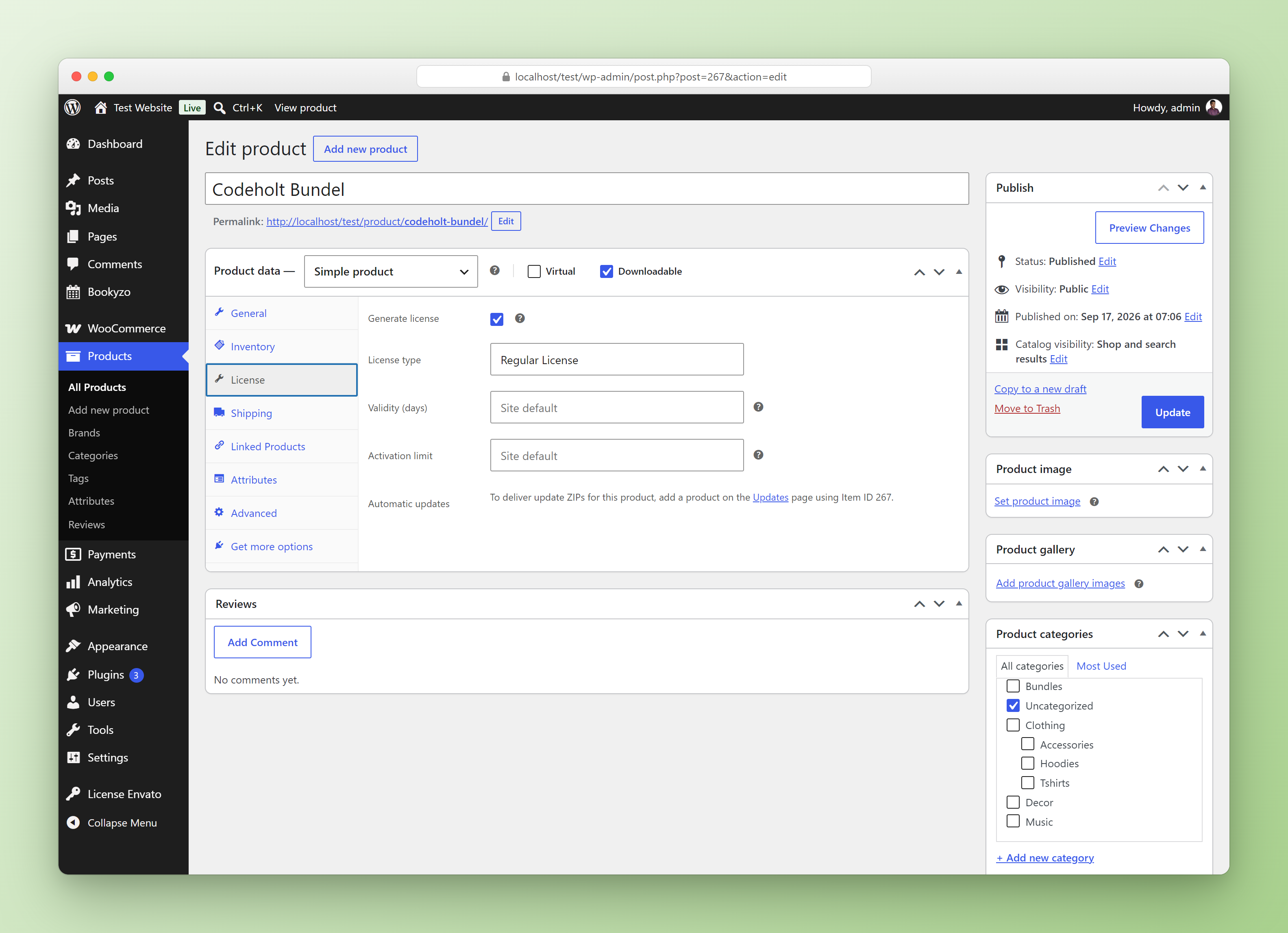
Product License Tab
The License tab is shown only while Downloadable is checked. Turning Downloadable off also turns licensing off for that product when you save.
| Field | What it does |
|---|---|
| Generate license | Issue a unique key for every unit of this product on each order. |
| License type | Label shown to the customer and in the Users list. Defaults to Regular License. |
| Validity (days) | Support/validity period. 0 = lifetime with no expiry; empty = use the site-wide default. |
| Activation limit | How many domains one key can be active on. Empty = use the site-wide default. |
| Automatic updates | To deliver update ZIPs for the product, add it on the Updates page using the product's ID as the Item ID (shown in this tab). |
WooCommerce Settings
Under Settings → General → WooCommerce Integration (see the Pro Settings screenshot above):
| Setting | What it does |
|---|---|
| Issue on order status | Completed (default) or Processing — use Processing for digital products that skip the Completed step. |
| Default validity (days) | Used when a product does not set its own validity. 0 = lifetime. |
| Cancel / refund | Automatically block the license keys of an order that is later cancelled or refunded. |
Order Behaviour
- No double issuing — an order that already has license keys is never issued again, even if WooCommerce fires the status change twice.
- Order notes — issued and blocked keys are recorded as notes on the order.
- Cancel / refund — the keys are added to the Blacklist, so they show up there like any manually blocked code and activation attempts get a
403. - Everything else is shared — issued keys appear in Users, obey the activation limit, support expiry, webhooks, notifications and the activity log.
My Account → Licenses
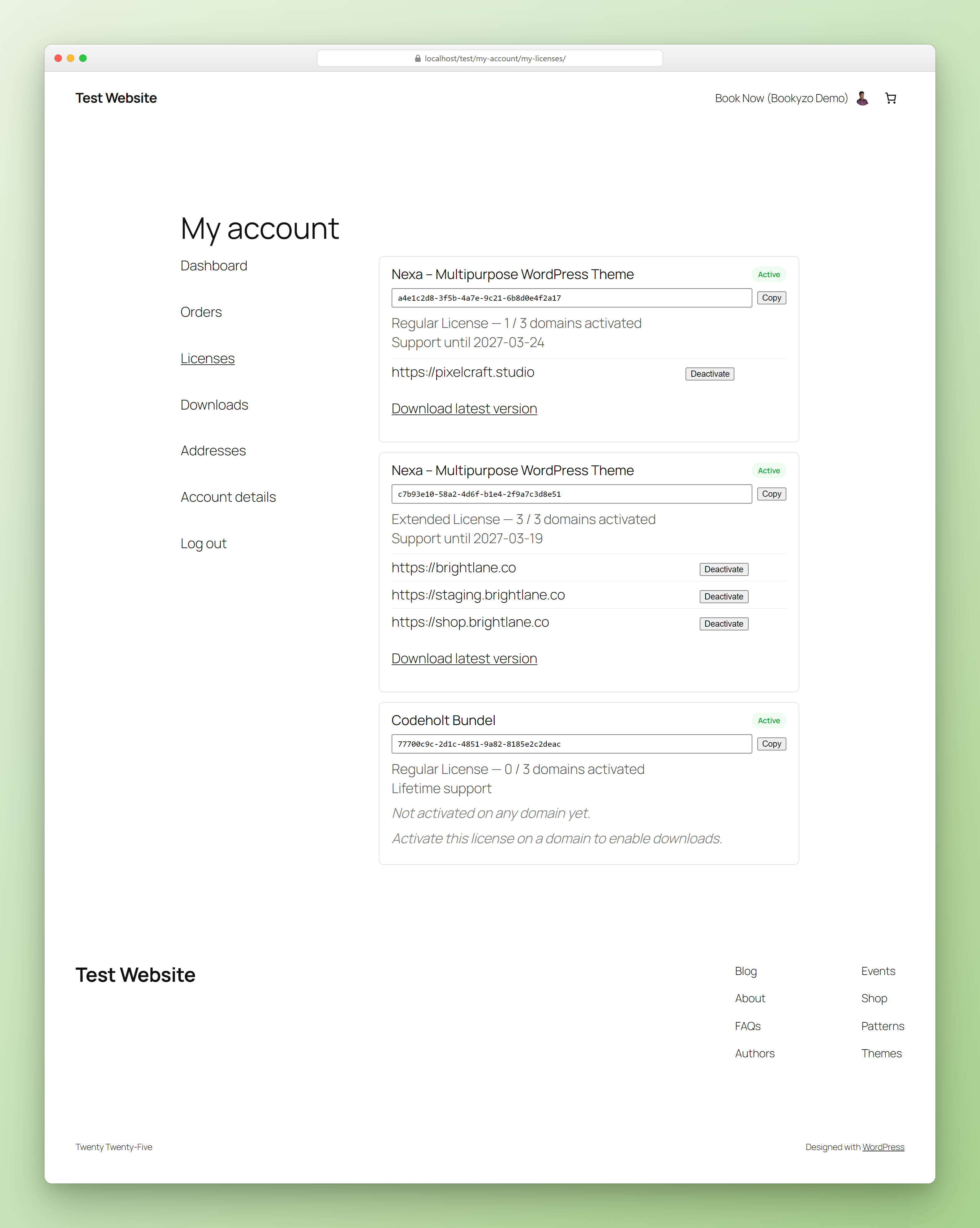
Logged-in customers get a Licenses tab (/my-account/my-licenses/). Each license card shows its status (Active / Expired / Blocked), the key with a Copy button, the license type, N / limit domains activated, support expiry and every activated domain with its own Deactivate button. Once the license is active on a domain and the product exists on the Updates page, a Download latest version link appears.